Products / Report Emailer
Office automation
Report Emailer
Email an Excel or CSV report to the right people on a schedule, automatically, from a Windows PC.
Every Monday someone opens last week's export, copies it into an email, adds the total, and sends it to the same five people. Report Emailer does that for you.
Point it at a file, or the folder where your exports land, and it sends a tidy email with the data in a table, totals for the columns you choose, and the file attached. It runs on the schedule you set, through your own Outlook or Gmail.
Best for: Office managers, bookkeepers, nonprofits, churches and small teams who send the same report every week or month.
- Windows 10
- Windows 11
- Classic Outlook
- Gmail and Google Workspace
- Other email with SMTP
What your team receives
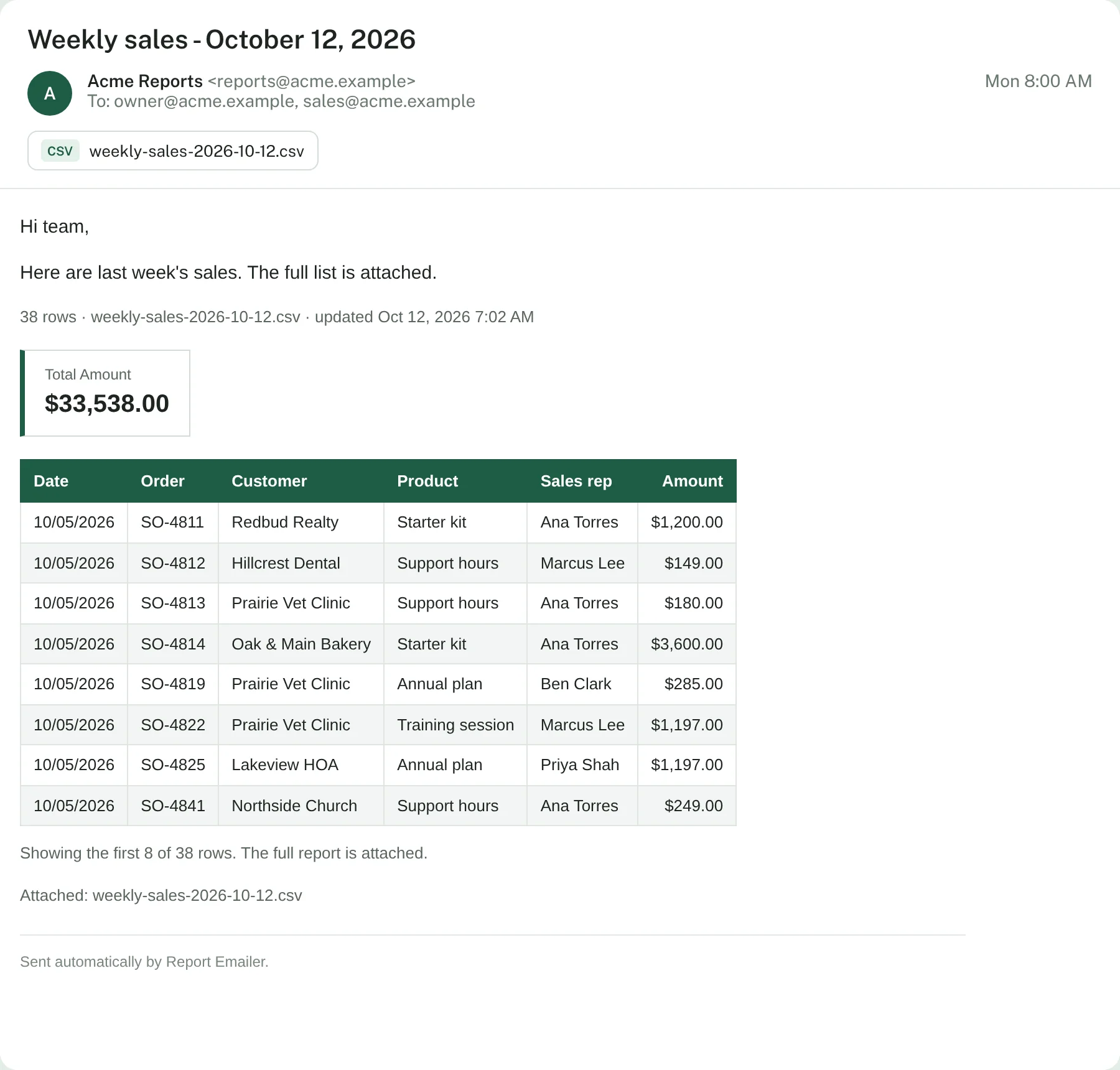
A sample weekly sales report for a fictional business, as it arrives in the inbox.
Set it up with a form
Choose your file, recipients and schedule in a simple form, and download a finished settings file. It checks for mistakes as you go. Also included in the download.
What it does
Nothing to install
Runs on PowerShell, which is built into Windows. Reads Excel files without Excel installed.
Always the newest file
Point it at a folder and it picks the latest export, for files named like sales-2026-10-12.csv.
A clean, readable email
Your message, a table with the columns you choose, totals, and the full file attached.
Your own email account
Sends through classic Outlook with no passwords, or Gmail and other providers with an encrypted app password.
On a schedule
Daily, weekdays, weekly or monthly. If the PC was off, the report goes out as soon as it's back.
No stale or empty reports
Skips a file that's empty or hasn't been updated, emails you an alert instead, and keeps a log.
Installing takes about 15 minutes
Buy and download
Checkout is handled by Payhip. You get the download link right away, by email too.
Describe your report
Say which file, who gets it and when, in one settings file. Preview it in your browser.
Turn on the schedule
Pick a menu option and Windows sends it on time from then on.
Pricing
Single business
$29 one-time
1 business or organization
- Unlimited reports
- 6 months of updates
- Setup help by email
Consultant
$79 one-time
Up to 10 businesses you serve
- Everything in Single business
- For bookkeepers, IT providers and consultants
- Clients keep using it after handoff
Prices in US dollars. Sales tax or VAT is added at checkout where it applies. See the license and refund policy.
Details
| Runs on | Windows 10 and 11, built-in PowerShell. Mac isn't supported |
|---|---|
| Reads | .xlsx and .csv files (not old .xls) |
| Sends with | Classic Outlook, or SMTP on port 587 (Gmail, Google Workspace, Zoho and others) |
| Schedules | Windows Task Scheduler: daily, weekdays, weekly, monthly |
| Privacy | Runs on your PC. Reports and passwords are never sent to us |
| Includes | Program, double-click menu, sample reports, setup guides |
| Updates | 6 months of updates and setup help by email |
Questions
Does it get the report out of my accounting or sales software?
No. It sends a file that's already on your PC. Many programs can save an export to a folder, and some can do it on a schedule. Point Report Emailer at that folder and it always sends the newest one.
Do I need Excel?
No. It reads .xlsx and .csv files itself. Old .xls files need to be saved as .xlsx or CSV first.
Does it work with Microsoft 365?
Yes, through classic Outlook on the PC. Microsoft is turning off password-based sending for Microsoft 365, so the SMTP option isn't recommended for those accounts. The new Outlook app can't be used by any automation tool.
Does the computer have to be on?
It needs to be on and signed in at the scheduled time; locked is fine. If it was off or asleep, the report is sent as soon as you're back.
Is my data sent anywhere else?
No. Everything runs on your PC and emails go out through your own account. Nothing is sent to us.
Does it work on a Mac?
No, it's for Windows 10 and 11. A Google Sheets edition that works on any computer is planned.
What if it doesn't work on my PC?
Contact us and we'll help. If we can't get it working, you can request a refund within 14 days of purchase.
Something else? Ask us.